
Have You Duplicated a Client Card?
Not to worry you can combine two patient records together…
- Make a note of patient card record number you want to keep.
- From any patient card click on List Patient button (top menu bar):
- Enter the patient’s surname i.e Hardaker, click ok.
- Patients with the surname Hardaker will be listed.
- Identify the two records you want to merge together and if they are listed together highlight both by clicking and dragging your mouse or hold the Ctrl key down on your keyboard and click each record to merge.
- Once highlighted, click on the Tools menu option:
- Select ‘Combine Data from 2 patient cards – the following window will appear:
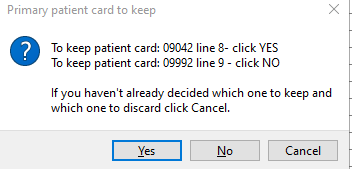
- Follow the instructions, above depending which patient card you decide to keep.
- One patient card will be Archived and the other you want to keep will now have all the data combined onto one card.
Note: You need to have permissions to delete a patient card to merge patients cards.