
Finance Tip: Setting up Kwik-Pay for a Patient
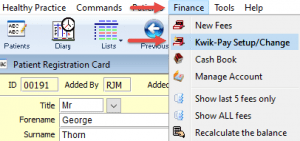
Kwik-Pay is an easy finance tip to set up and use. First you need to tell Kwik-Pay what treatment a patient normally has and how they pay. Go to the patient registration card and select the Finance tab/page. Then from the Finance menu, select Kwik-Pay Setup/Change:
Click on the arrows to select the Default Treatment and Default Pay Method. (Note you should select the treatment and payment that the patient has most frequently. You will be able to choose different options at the time of recording Kwik-Pay if needed.)
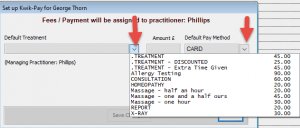
Click Save Changes. (Note: you are also able to set up defaults from the diary, but this is not detailed in this Quick Tip).
Quick Finance Tip
Recording Kwik-Pay from registration card?
Remember the money will go to the managing practitioner – the one listed on the patient card.
Recording Kwik-Pay from the Diary?
Remember the money will go to the attending practitioner – the one in the diary.
Want to quickly record a more complicated fee?
Just press the Ctrl key on your keyboard and click on Kwik-Pay. It’s as easy as that.